Introduction
- Fast and general-purpose cluster computing system.
- It provides high-level APIs in Java, Scala, Python, etc.
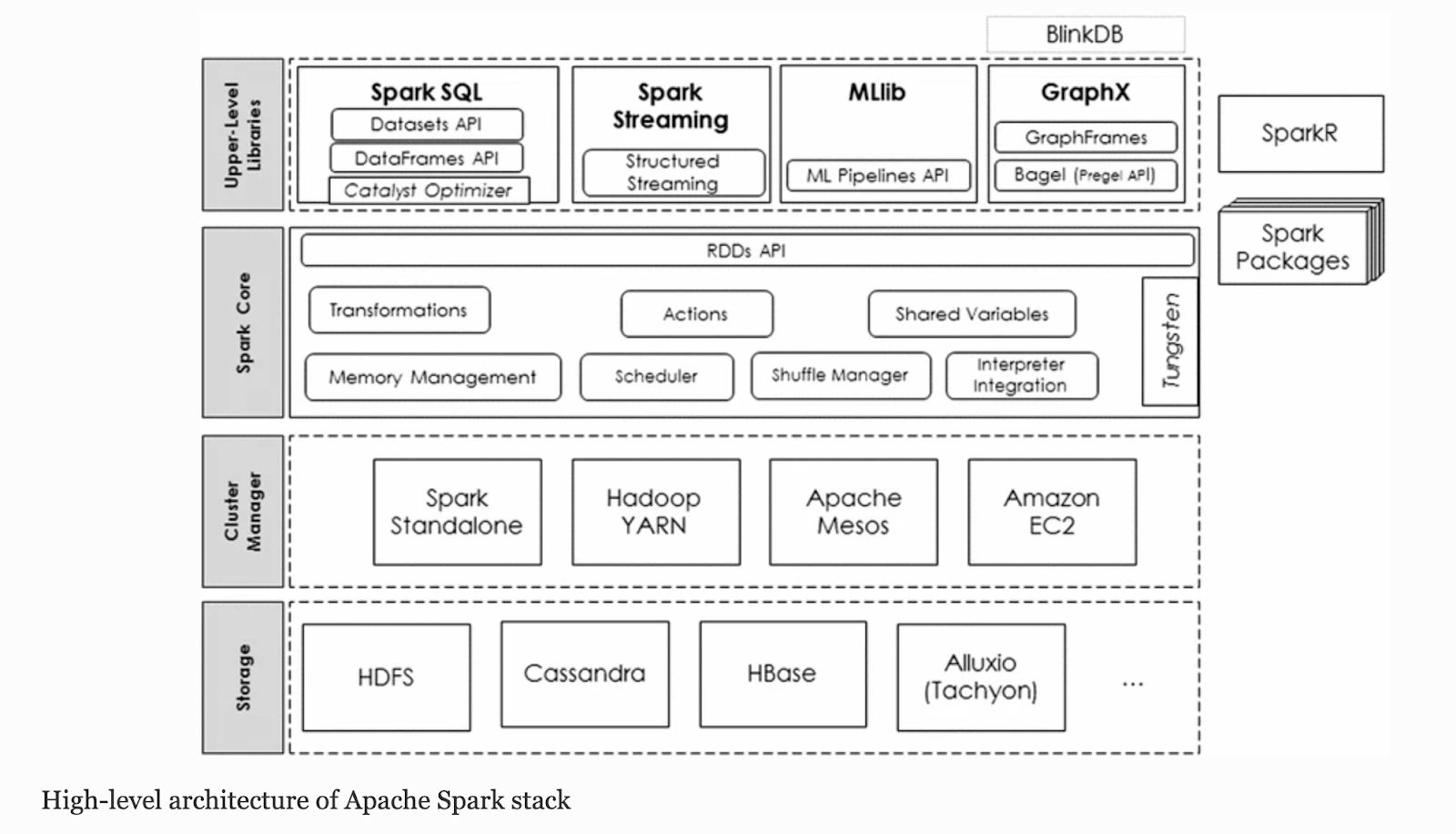
- Core data abstraction is the Resilient Distributed Dataset (RDD)
- Abstraction which provides an efficient data sharing between computations
- It automatically distributes the data across the cluster and parallelizes the required operations.
- Integrates with many storage systems (e.g., HDFS, Cassandra, HBase, S3)
- In addition, the DataFrame and Dataset APIs of Spark SQL provide a higher level of abstraction for structured data
- A cluster manager is used to acquire cluster resources for executing jobs.
- Spark core runs over diverse cluster managers including Hadoop YARN, Apache Mesos, Amazon EC2 and Spark’s built-in cluster manager (i.e., standalone).
Components
- Running a Spark application involves five key entities
- Driver program, Cluster manager, Workers, Executors and Tasks.
- A driver program is an application that uses Spark as a library and defines a high-level control flow of the target computation
- Worker provides CPU, memory and storage resources to a Spark application
- Executer is a JVM (Java Virtual Machine) process that Spark creates on each worker for that application.
- A job is a set of computations (e.g., a data processing algorithm) that Spark performs on a cluster to get results to the driver program.
- A Spark application can launch multiple jobs.
- Spark splits a job into a directed acyclic graph (DAG) of stages where each stage is a collection of tasks.
- A task is the smallest unit of work that Spark sends to an executor.
- The main entry point for Spark functionalities is a SparkContext through which the driver program access Spark.
- A SparkContext represents a connection to a computing cluster.
Cluster Mode Overview
- Specifically, to run on a cluster, the SparkContext can connect to several types of cluster managers
- Which allocate resources across applications.
- Once connected, Spark acquires executors on nodes in the cluster, which are processes that run computations and store data for your application.
- Next, it sends your application code (defined by JAR or Python files passed to SparkContext) to the executors.
- Finally, SparkContext sends tasks to the executors to run.
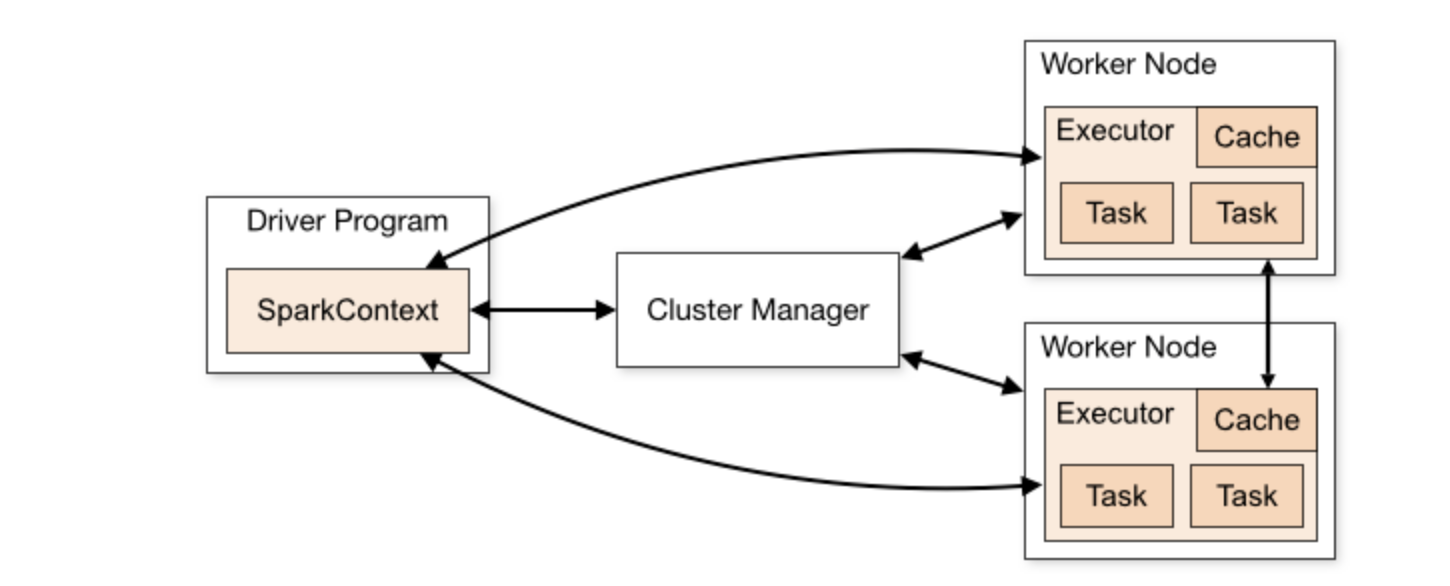
- Each application gets its own executor processes, which stay up for the duration of the whole application and run tasks in multiple threads.
- This has the benefit of isolating applications from each other, on both the scheduling side (each driver schedules its own tasks) and executor side (tasks from different applications run in different JVMs).
- However, it also means that data cannot be shared across different Spark applications (instances of SparkContext) without writing it to an external storage system.
- Spark is agnostic to the underlying cluster manager.
- The driver program must listen for and accept incoming connections from its executors throughout its lifetime. As such, the driver program must be network addressable from the worker nodes.
- Because the driver schedules tasks on the cluster, it should be run close to the worker nodes, preferably on the same local area network.
RDDs
- RDDs provide read-only fault-tolerant, parallel data structures that let users store data explicitly on disk or in memory, control its partitioning and manipulate it using a rich set of operators
- An RDD can be created either from external data sources or from other RDDs.
- Each RDD is represented through a common interface with five pieces of information: partitions, dependencies, an iterator, preferred locations (data placement), and metadata about its partitioning schema.
- Lazy evaluation of RDDs: transformations on RDDs are lazily evaluated, meaning that Spark will not compute RDDs until an action is called.
- Spark keeps track of the lineage graph of transformations, which is used to compute each RDD on demand and to recover lost data
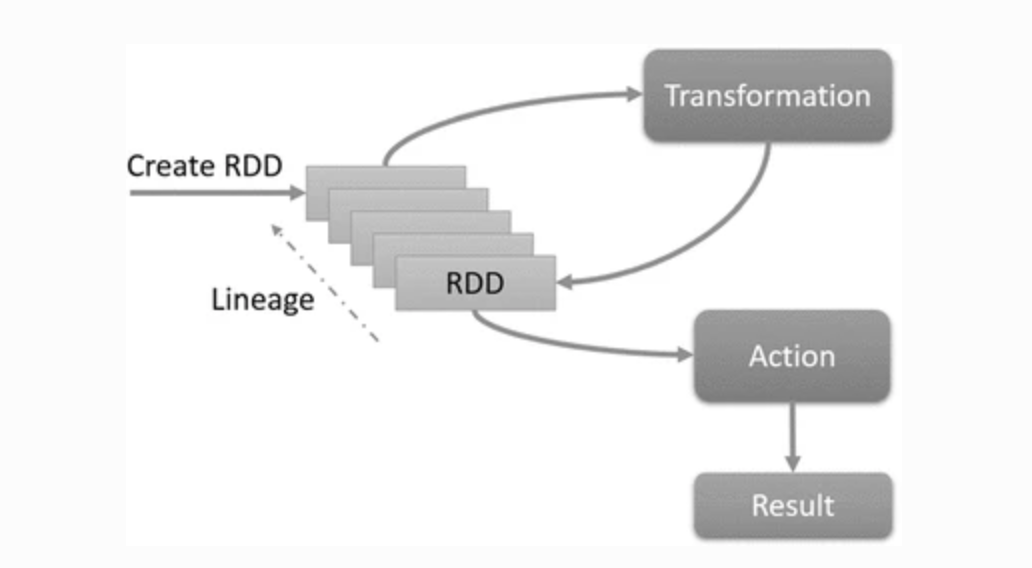
Actions, Transformation & Shared Variable
- Transformations are deterministic, but lazy, operations which define a new RDD without immediately computing it
- On the other hand, multiple child partitions may depend on the same partition of the parent RDD as a result of wide transformations (e.g., join, groupByKey, etc).
- An action (e.g. count, first, take, etc) launches a computation on an RDD and then returns the results to the driver program or writes them to an external storage. Transformations are only executed when an action is called.
- At that point, Spark breaks the computation into tasks to run in parallel on separate machines.
- Each machine runs both its part of the transformations and the called action, returning only its answer to the driver program.
- Shared Variables: broadcast variable and accumulators
- Broadcast variables are used to keep read-only variables cached on each machine
- Accumulators, on the other hand, are variables that workers can only add to through an associative operation and the driver can only read. They can be used to implement counters or sums.
DataFrame and DataSet APIs
- DataFrame is conceptually equivalent to a table in a relational database
- It is a distributed collection of data, like RDD, but organized into named columns
- DataFrame is one step ahead of RDD. Since it provides memory management and optimized execution plan.
- Custom Memory Management: A lot of memory is saved as the data is stored in off-heap memory in binary format. Apart from this, there is no Garbage Collection overhead. Expensive Java serialization is also avoided. Since the data is stored in binary format and the schema of memory is known.
- Optimized Execution plan: This is also known as the query optimizer. Using this, an optimized execution plan is created for the execution of a query. Once the optimized plan is created final execution takes place on RDDs of Spark.
- DataFrame API can perform relational operations on RDDs and external data sources and enables rich relational/ functional integration within Spark applications.
- Dataset API: extension of the DataFrame API that provides a type-safe, object-oriented programming interface.
- A Dataset is a strongly typed, immutable collection of objects that are mapped to a relational schema
Installation and submit a Job
Install scala if not already installed
Quick start tutorial
https://spark.apache.org/docs/1.2.1/quick-start.html
Install scala if not already installed
$ scala -version
$ brew install scala

cd <HOME_DIR>/installs/spark-2.4.4-bin-hadoop2.7

Launch shell
$ ./bin/spark-shell --master local


scala> val textFile = sc.textFile("README.md")
textFile: org.apache.spark.rdd.RDD[String] = README.md MapPartitionsRDD[1] at textFile at <console>:24

scala> textFile.count()
res0: Long = 105

scala> val linesWithSpark = textFile.filter(line => line.contains("Spark"))
linesWithSpark: org.apache.spark.rdd.RDD[String] = MapPartitionsRDD[2] at filter at <console>:25

scala> textFile.filter(line => line.contains("Spark")).count()
res1: Long = 20

scala> linesWithSpark.count()
res2: Long = 20
Example: Find profiles/emails given the transaction history on a website like Amazon
Problem statement: Transaction information of Spent on info with Item, find the emails of the users which spent more than X amount of money
    String logFile = "hdfs://localhost:9000/user/test/input/" + FILE_NAME;

    SparkConf conf = new SparkConf().setAppName("Audience Event Filtering").setMaster("local");
    JavaSparkContext sc = new JavaSparkContext(conf);
    SQLContext sqlContext = new SQLContext(sc);

    Dataset<Row> events = sqlContext.read().format("avro").load(logFile);
    Dataset<Row> agg = events.groupBy(events.col("userId")).agg(functions.sum(events.col("spent")));
    agg.show();

    String outputPath = "hdfs://localhost:9000/user/test/input/" + OUTPUT_FILE_NAME + "_" + System.nanoTime();
    agg.write().format("csv").save(outputPath);

    Dataset<Row> aggregatedData = sqlContext.read().format("csv").load(outputPath + "/*.csv");
    Dataset<Row> filter = aggregatedData.filter("_c1 >= 10000.0");
    long count = filter.count();
    System.out.println("Count of filtered user ids " + count);
    filter.show();

    Dataset<Row> profiles =
        sqlContext.read().format("avro").load("hdfs://localhost:9000/user/test/input/" + PROFILE_FILE_NAME);
    Dataset<Row> joinedDataSet = filter.join(profiles, profiles.col("id").equalTo(aggregatedData.col("_c0")));
    joinedDataSet.select("id", "email", "name", "_c1").show();

    sc.stop();
Download Code
https://github.com/nihitpurwar/spark-intro/
References
- http://spark.apache.org/docs/latest/quick-start.html#more-on-rdd-operations
- https://spark.apache.org/docs/1.2.1/programming-guide.html
- http://spark.apache.org/docs/latest/sql-programming-guide.html
- https://spark.apache.org/docs/latest/cluster-overview.html
- https://spark.apache.org/docs/latest/monitoring.html
- https://link.springer.com/article/10.1007/s41060-016-0027-9
 Nihit Purwar