Introduction
- Built for Scale
- Fault-tolerant and is designed to be deployed on low-cost hardware
- Hundreds or thousands of server machines, each storing part of the file system’s data.
- Detection of faults and quick, automatic recovery from them is a core architectural goal of HDFS.
- Designed for batch processing rather than interactive use by users.
- High throughput of data access rather than low latency of data access.
- A typical file in HDFS is gigabytes to terabytes in size. Thus, HDFS is tuned to support large files.
- Simple Coherency Model
- HDFS applications need a write-once-read-many access model for files.
- File once created, written, and closed need not be changed.
- This assumption simplifies data coherency issues and enables high throughput data access.
- A MapReduce application or a web crawler application fits perfectly with this model.
- Moving Computation is Cheaper than Moving Data
- A computation requested by an application is much more efficient if it is executed near the data it operates on.
- This minimizes network congestion and increases the overall throughput of the system
- HDFS provides interfaces for applications to move themselves closer to where the data is located.
Architecture
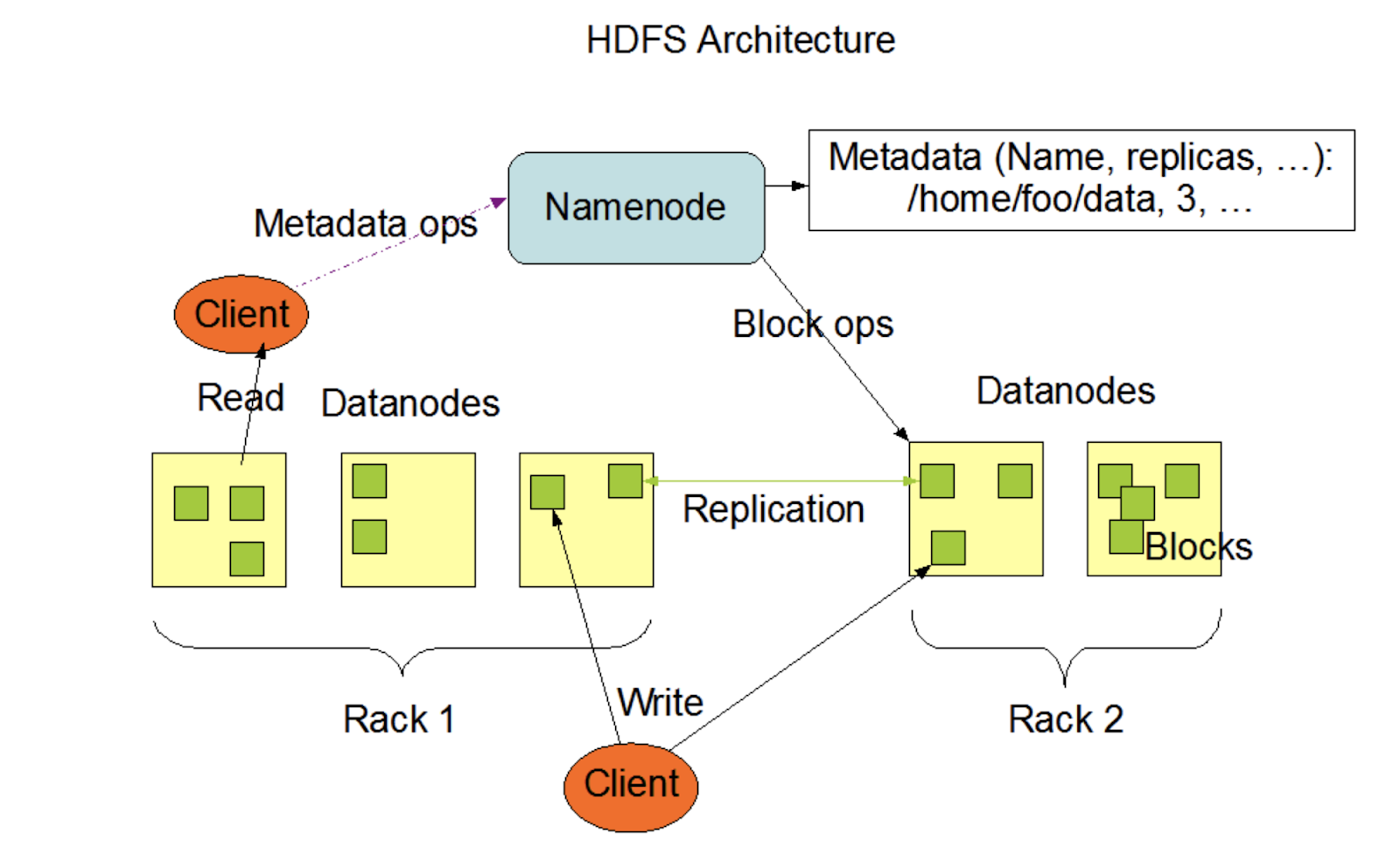
- HDFS has a master/slave architecture.
- Single NameNode in a cluster:
- manages the file system namespace
- regulates access to files by clients.
- executes file system namespace operations like opening, closing, and renaming files and directories
- It also determines the mapping of blocks to DataNodes.
- Number of DataNodes:
- Usually one per node in the cluster, which manage storage attached to the nodes that they run on.
- Responsible for serving read and write requests from the file system’s clients.
- Also perform block creation, deletion, and replication upon instruction from the NameNode.
- HDFS exposes a file system namespace and allows user data to be stored in files.
- Storage
- Internally, a file is split into one or more blocks and these blocks are stored in a set of DataNodes.
Install Hadoop and start services
brew install hadoop

// Set in .bashrc
alias hstart="/usr/local/cellar/hadoop/3.2.1/sbin/start-all.sh"
alias hstop="/usr/local/cellar/hadoop/3.2.1/sbin/stop-all.sh"
Basic commands
hdfs dfs -put <localsrc> ... <HDFS_dest_Path>
cd /usr/local/cellar/hadoop/3.2.1/bin

hdfs dfs -cat /user/test/input/README.txt
hdfs dfs -ls /user/test/input/README.txt

hdfs getconf -confKey fs.defaultFS
Read more commands here
References:
 Nihit Purwar